Blocks–Advanced
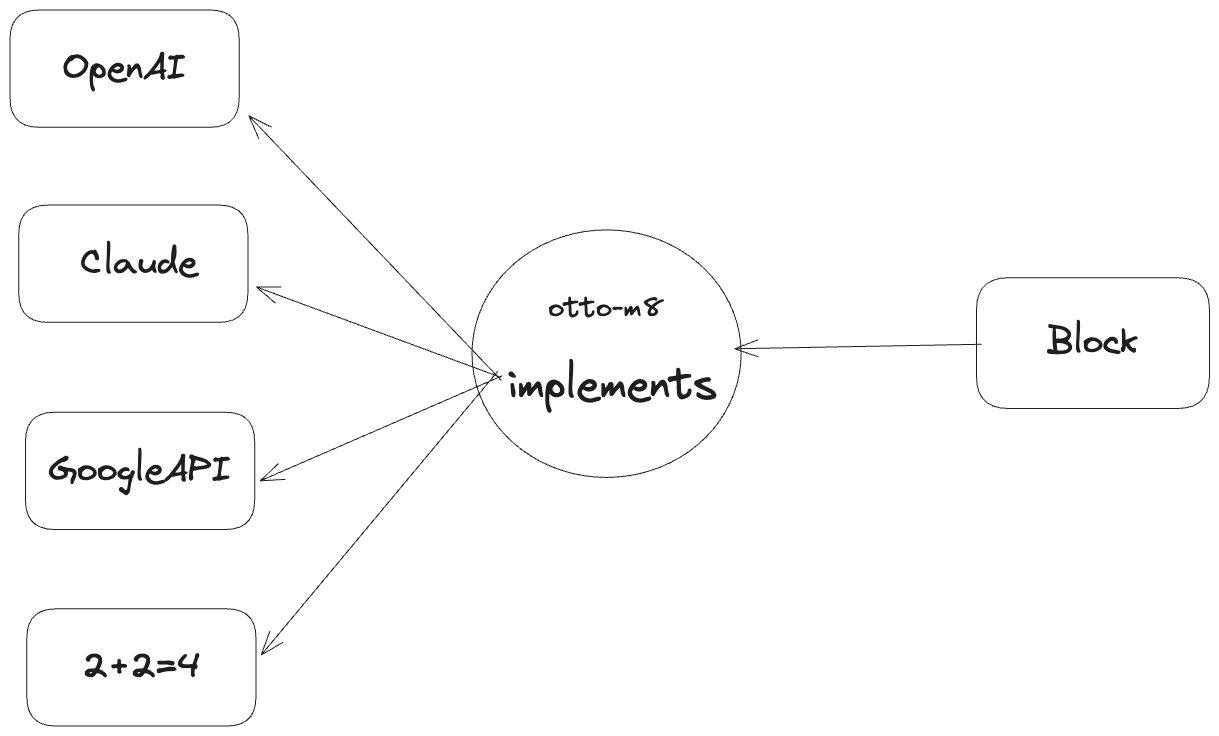
Implementations - a deeper dive by example
In otto-m8, a block is essentially an implementation of some software program. This software program can be AI/ML implementations or third party API integrations. To enable developers to build a block, you write an implementation of something you want to integrate into otto-m8. So let's take the OpenAI block for example whose implementation would look as follows:
from openai import OpenAI
from implementations.base import (
    BaseImplementation,
    BlockMetadata,
    Field,
    FieldType
)
from other_imports import *


class OpenAIChat(BaseImplementation):
    """Task definition of the OpenAI Chat Completion."""
    display_name = 'OpenAI Chat Completion'
    block_type = 'process'
    block_metadata = BlockMetadata([
        Field(
            name="openai_api_key",
            display_name="OpenAI API Key",
            is_run_config=True,
            show_in_ui=False,
            type=FieldType.PASSWORD.value
        ),
        Field(
            name="model",
            display_name="Model",
            is_run_config=True,
            default_value='gpt-4o-mini'
        ),
        Field(
            name="system",
            display_name="System Prompt",
            is_run_config=True,
            show_in_ui=False,
            type=FieldType.TEXTAREA.value
        ),
        Field(
            name="prompt_template",
            display_name="Prompt Template",
            is_run_config=True,
            show_in_ui=False,
            type=FieldType.PROMPT_TEMPLATE.value
        ),
    ])

    def __init__(self, run_config:dict) -> None:
        super().__init__()
        self.run_config = run_config
        self.openAI_client = OpenAI(
            api_key=self.run_config.get('openai_api_key'),
        )
        self.others = [...]

    def run(self, input_:dict) -> dict:
        # logic for running open ai chat completion
        pass
which should render the following on the dashboard:
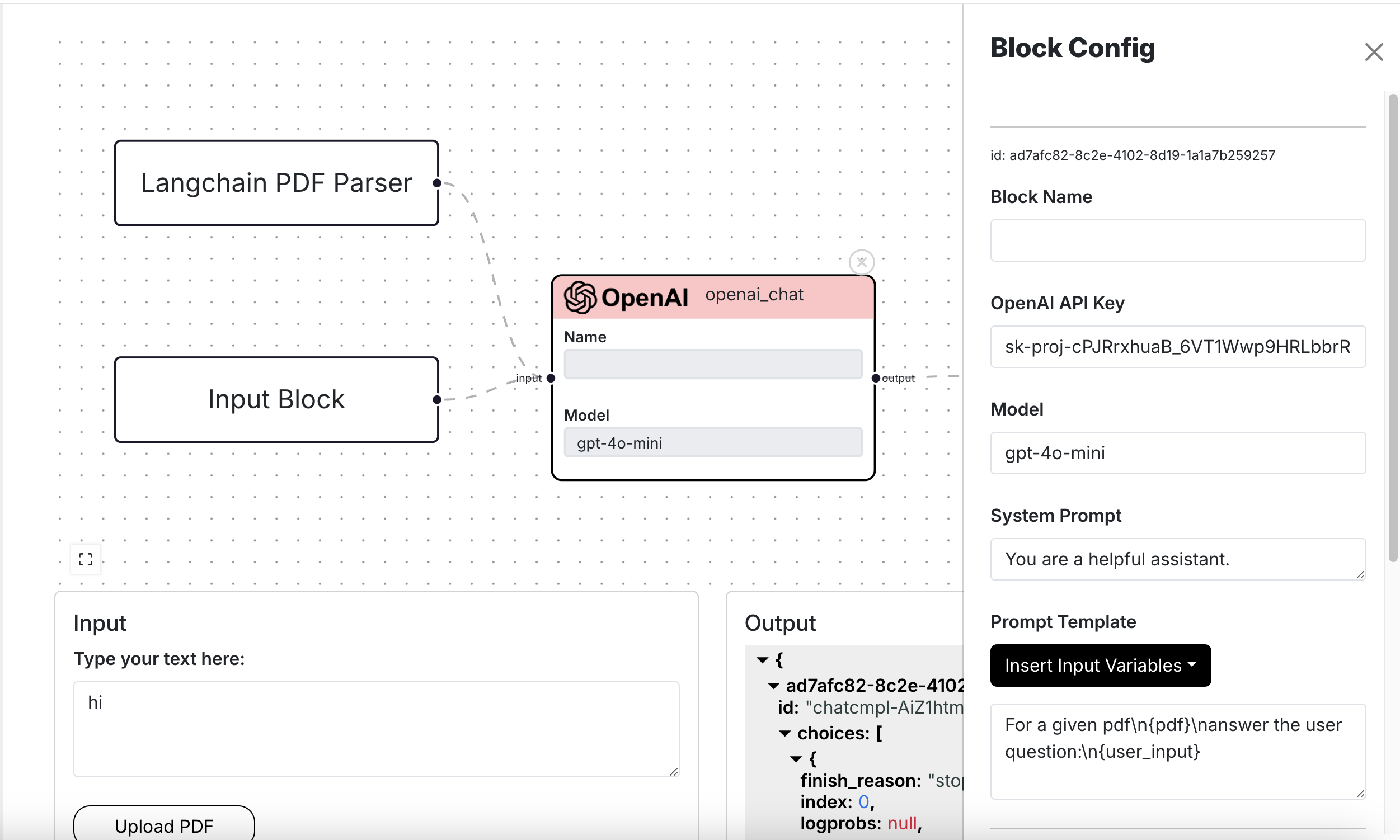
As you'll notice in the Fields within BlockMetadata, anything where is_run_config==True is rendered on the block configuration sidebar. And
similarly for anything show_in_ui==True shows up on the Reactflow node. Furthermore, the order in which the Fields are placed determines the
order in which they'll appear on the dashboard.
To break things down, an implementation would generally be made of the following:
display_name: This is the name that will show up on the sidebar when selecting a block.block_type: This indicates whether a block is of type input, process or output.block_metadata: The block metadata is made up of all the data that each block will possess, including data that will be considered part of run configuration, data that will be displayed on the Reactflow node(the Block) itself, and other data that the dashboard will need.
Block Metadata
from typing import List
from core.blocks.field import Field

class BlockMetadata:
    """BlockMetadata groups together the fields of a block. This helps an Implementation
    class to define the fields that are visible in the block's UI,
    the fields that are visible in the block's sidebar, and generating the initial
    state of the Block(Reactflow nodes).
    """
    def __init__(self, fields:List[Field]) -> None:
        default_fields = [
            Field(name="custom_name", display_name="Block Name"),
            Field(name="source_code", display_name="View Code", is_run_config=False, show_in_ui=False),
            Field(name="source_path", display_name=None, is_run_config=False, show_in_ui=False),
            Field(name="source_hash", display_name=None, is_run_config=False, show_in_ui=False),
            Field(name="process_type", display_name=None, is_run_config=False, show_in_ui=False),
            Field(name="core_block_type", display_name=None, is_run_config=False, show_in_ui=False),
        ]
        """Default fields that are common across all blocks"""

        self.fields = [*default_fields, *fields]
Field
from enum import Enum
from typing import List, Union, Any, Dict
from pydantic import BaseModel

class Field(BaseModel):
    """Base representation of a field in a block. These are used by
    users to configure a block or see the block's configuration in the block.
    """
    name: str
    """Name of the field used for programatic access to the block's metadata"""
    display_name: Union[str, None] = None
    """The text that will be displayed on the UI to represent the block's metadata"""
    default_value: Any = ''
    """Default value the field will hold"""
    type:str = FieldType.TEXT.value
    """The type of field rendered"""
    metadata: Dict[str, Any] = {}
    """Any additional metadata for the field"""
    is_run_config: bool = True
    """Flag to determine whether the field is configurable by the user, or part of the `run_config`"""
    show_in_ui: bool = True
    """Flag to determine whether this field will be rendered on the Reactflow node"""
FieldType
class FieldType(Enum):
    TEXT = 'text'
    PASSWORD = 'password'
    TEXTAREA = 'textarea'
    NUMBER = 'number'
    STATIC_DROPDOWN = 'static_dropdown'
    LAMBDAS_DROPDOWN = 'lambdas_dropdown'
    TOOL_LIST = 'tool_list'
    PROMPT_TEMPLATE = 'prompt_template'
    MULTIMODAL_SELECTOR = 'multimodal_selector'
    GCLOUD_AUTH = 'gcloud_auth'
StaticDropdownOption
Use the StaticDropdownOption when using FieldType of STATIC_DROPDOWN and you want to render
a dropdown with a pre-determined set of options.
class StaticDropdownOption(BaseModel):
    """Object to represent a dropdown option for a static dropdown."""
    value: str
    label: str

    def __dict__(self):
        return {
            'value': self.value,
            'label': self.label
        }
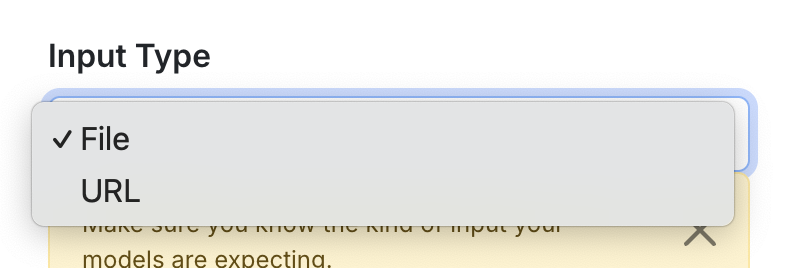
An example usage of StaticDropdownOption:
...

class LangchainPDFLoader(BaseImplementation):
    display_name = 'PDF Loader'
    block_type = 'process'
    block_metadata = BlockMetadata([
        ...,
        Field(name="input_type", display_name="Input Type", is_run_config=True, show_in_ui=False,
              type=FieldType.STATIC_DROPDOWN.value,
              default_value=InputType.FILE.value,
              metadata={
                  'dropdown_options': [
                      StaticDropdownOption(value=InputType.FILE.value, label="File").__dict__,
                      StaticDropdownOption(value=InputType.URL.value, label="URL").__dict__,
              ]}
        ),
    ])
    ...
This renders the following:
MultimodalField
class MultimodalField:
    """Object to represent a field for a multimodal selector."""
    def __init__(
        self,
        image:Field,
        text:Field,
        name: Union[str, None] = None,
        display_name: Union[str, None] = None,
        is_run_config: bool = True,
        show_in_ui: bool = False
    ) -> None:
        self.name = name
        self.display_name = display_name
        self.image = image
        self.text = text
        self.type = FieldType.MULTIMODAL_SELECTOR.value
        self.show_in_ui = show_in_ui
        self.is_run_config = is_run_config

    def __dict__(self):
        result = {
            'name': self.name,
            'display_name': self.display_name,
            'type': self.type,
            'image': self.image.__dict__,
            'text': self.text.__dict__,
            'is_run_config': self.is_run_config,
            'show_in_ui': self.show_in_ui,
        }

        return result