Templates
The Template is a JSON file which serves as a blueprint for a workflow, the resources that need to be run and how they'll be run. Otto-m8's UI lets users drag and drop Blocks, configure them and interconnect them with other blocks. While the UI enables users to understand what is going on, we still need to instruct backend on how and what to run. To do this, we need a way to map the frontend UI elements and its configurations into a format that the backend will understand.
Example Template
For instance, for the following workflow, where the user configured a Langchain PDF Parser and a Text Input, connected
with OpenAI Chat, the UI would look something like:
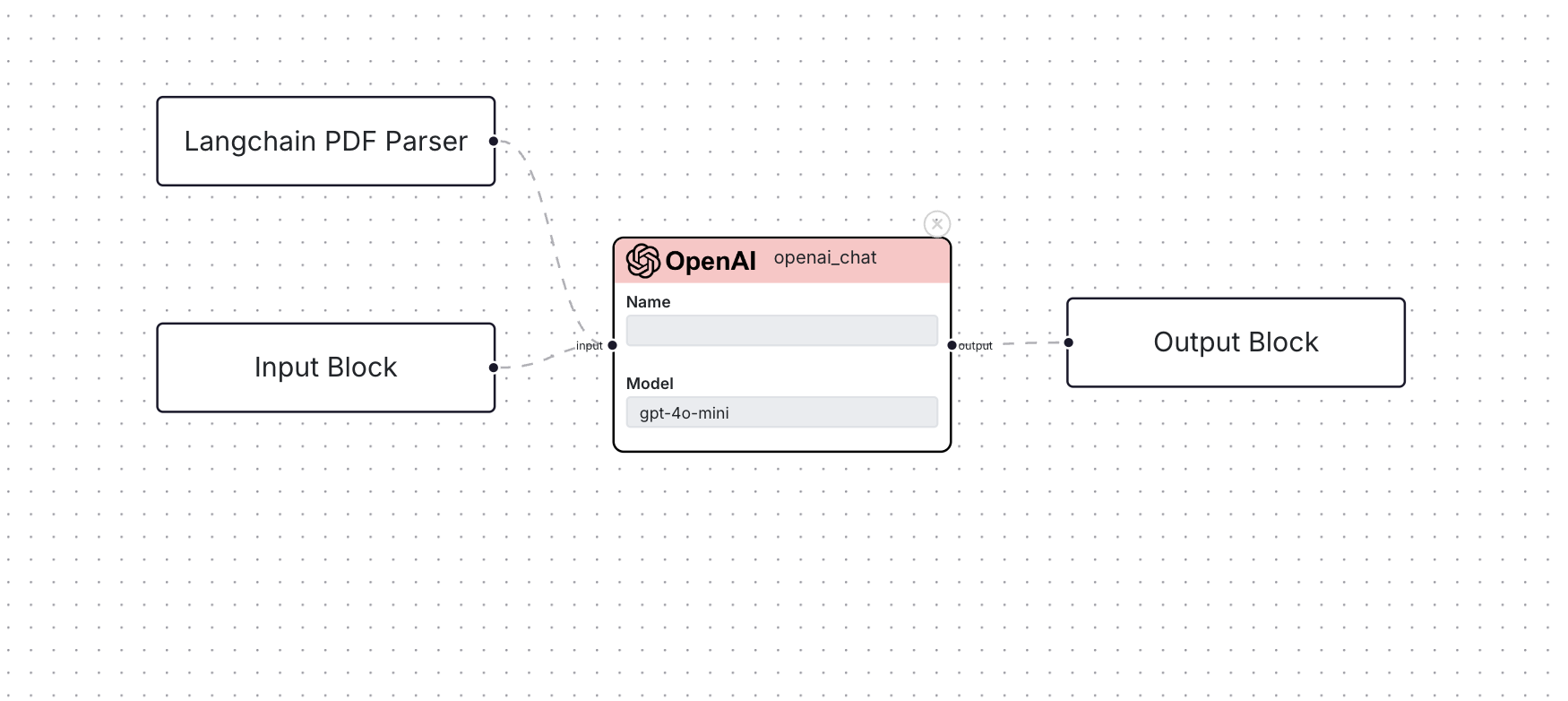 and, the template will look as follows:
{
  "workflow_name": "openai_test",
  "input": [
    {
      "name": "Input_Block",
      "block_type": "input",
      "connections": [
        "process.ad7afc82-8c2e-4102-8d19-1a1a7b259257"
      ],
      "run_config": {},
      "implementation": null,
      "custom_name": "user_input",
      "payload": null,
      "input_type": "text",
      "process_metadata": {
        "core_block_type": "text_input",
        "process_type": "task"
      }
    },
    {
      "name": "Langchain_PDF_Parser",
      "block_type": "input",
      "connections": [
        "process.ad7afc82-8c2e-4102-8d19-1a1a7b259257"
      ],
      "run_config": {},
      "implementation": null,
      "custom_name": "pdf",
      "payload": null,
      "input_type": "file",
      "process_metadata": {
        "core_block_type": "langchain_pdf_loader",
        "process_type": "task",
        "files_to_accept": "application/pdf",
        "button_text": "Upload PDF"
      }
    }
  ],
  "process": [
    {
      "name": "ad7afc82-8c2e-4102-8d19-1a1a7b259257",
      "block_type": "process",
      "connections": [
        "output.Output_Block"
      ],
      "run_config": {
        "model": "gpt-4o-mini",
        "pass_input_to_output": false,
        "system": "You are a helpful assistant.",
        "openai_api_key": "sk-proj-cPJRrxhuaB_6VT1Ww",
        "prompt_template": "For a given pdf\\n{pdf}\\nanswer the user question:\\n{user_input}"
      },
      "implementation": null,
      "custom_name": "",
      "process_metadata": {
        "core_block_type": "openai_chat",
        "process_type": "task"
      }
    }
  ],
  "output": [
    {
      "name": "Output_Block",
      "block_type": "output",
      "connections": [],
      "run_config": {},
      "implementation": null
    }
  ],
  "version": 1
}
Building Blocks
To sum up concepts from the previous section on Blocks, and Workflows, a Template is a textual representation of all the resources needed to run a workflow.
Block
class Block(BaseModel, extra = 'forbid', arbitrary_types_allowed = True):
    name: str
    block_type: str = 'simple_block'
    connections: list[str] = Field(description="List of connections to other blocks in the model", default=[])
    run_config: dict = Field(description="Configuration for the run", default=None)
    implementation: Union[BaseImplementation, None] = Field(description="The implementation of the block", default=None)
Input Block
class InputBlock(Block):
    custom_name: str = 'user_input'
    block_type: str = 'input'
    payload: Union[str, None] = None
    # The input type of the block determines the type of the input in the run config that will be passed to a model.
    input_type: str = 'text'
    process_metadata: dict = {}
Process Block
class ProcessBlock(Block):
    custom_name: str
    block_type: str = 'process'
    process_metadata: dict = {}
Output Block
class OutputBlock(Block):
    block_type: str = 'output'
Workflow Template
class WorkflowTemplate(BaseModel, extra='forbid'):
    workflow_name: str
    input: List[InputBlock]
    process: List[ProcessBlock]
    output: List[OutputBlock]
    version: float = 1.0